
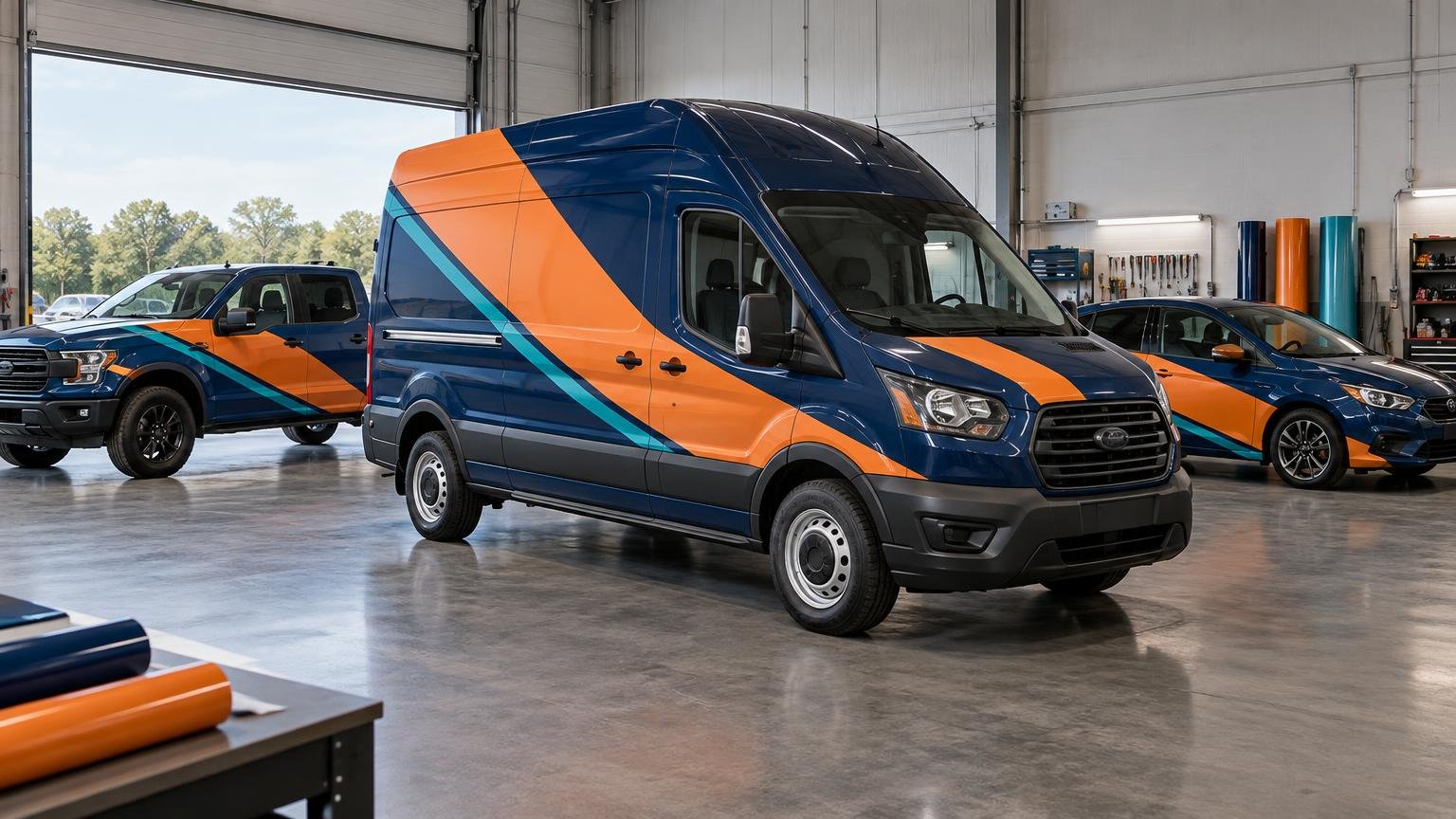
The key to how to design a fleet wrap system that works across vans, trucks, and cars is to standardize the brand rules, not the exact artwork. Lock a small group of recognizable elements—logo treatment, colors, typography, message hierarchy, and contact format—then create approved layout families for different vehicle shapes.
A cargo van gives you broad side panels. A pickup interrupts the design with a bed gap, wheel arches, handles, and trim. A sedan compresses the same message onto curved doors and short rear quarters. Stretching one master composition across all three usually produces inconsistent logo sizes, awkward crops, and important copy that lands on hardware. A modular system preserves recognition while allowing each vehicle to use its available space properly.
How to design a fleet wrap system that works across vans, trucks, and cars
Start by separating fixed brand elements from flexible layout decisions. Fixed elements make the fleet look related. Flexible elements let the designer respond to scale, viewing distance, panel geometry, factory paint color, and installation constraints.
| System element | Keep consistent | Adapt by vehicle |
|---|---|---|
| Logo | Approved version, proportions, colors, and clear space | Scale and placement |
| Color field | Core palette and color relationships | Coverage, crop, and interaction with factory paint |
| Typography | Approved typefaces and hierarchy | Maximum size, line breaks, and copy volume |
| Service message | One short positioning statement | Placement and optional supporting service list |
| Contact method | Formatting and preferred primary action | URL or phone emphasis based on available space |
| Graphic style | Image treatment, pattern, illustration, or shape language | Crop, orientation, and complexity |
Do not make every available panel carry every element. Consistency comes from repeating a recognizable visual grammar, not filling each vehicle with the same collection of words.
Build a three-level message hierarchy
A moving vehicle is not a brochure. The first visual task is immediate brand recognition. The second is explaining what the business does. The third is giving an interested viewer a way to act when traffic conditions and viewing time permit.
- Brand: Use the logo, distinctive color field, or another recognizable brand device as the dominant element.
- Service: State what the company does in a short descriptor that can be understood without studying the vehicle.
- Action: Provide one primary contact path, normally a short URL or memorable phone number. Treat a QR code as a secondary element for parked or stopped viewing, not as the main roadside message.
Typography deserves more attention than it usually receives. The International Sign Association includes typography and distance legibility among the relevant subjects in its print and wrap training resources. In practice, that means judging the design at a small on-screen size and from realistic street-viewing angles. If the service descriptor disappears when the vehicle mockup is reduced, adding more copy will not solve the problem.
Reserve detailed service lists, multiple social handles, promotional claims, and secondary phone numbers for other marketing channels. On a compact car, even the short descriptor may need to move to the rear door or disappear entirely so the logo remains clear.
Create layout families for vehicle classes
Build several controlled templates rather than one universal template or a custom design for every unit. Three starting families work for many mixed fleets: large flat-sided vehicles, segmented utility vehicles, and compact curved vehicles.
Cargo vans and box trucks
Use the large side area for the fullest version of the system: dominant brand field, service descriptor, and one contact method. Keep the composition readable when sliding doors are open and when door seams interrupt the surface. On tall vehicles, place essential information where it remains visible to drivers and pedestrians rather than automatically centering it across the full body height.
Treat the rear as a separate design. Split doors, hinges, windows, handles, cameras, license plates, and step bumpers change both the usable area and the viewing context. Rear traffic may have more time to read a URL or short phone number, but the logo and service category should still lead.
Pickups, utility bodies, and SUVs
A pickup cab and bed are visually and physically separate. Do not bridge alignment-sensitive words or images across that gap. Use the doors for the main identifier, then let a simplified color field or pattern continue onto the bed. Utility compartments require individual panel planning so handles and latches do not break critical information.
SUVs and crossovers often have enough side area for a partial wrap, but their rising beltlines, molded trim, wheel arches, and curved rear quarters can make a van-style rectangle look heavy. Reduce the copy and use shapes that resolve cleanly before the most difficult curves.
Sedans and compact cars
Cars need the simplest composition. Prioritize a strong door logo or recognizable side graphic, a short service descriptor, and a restrained rear treatment. Avoid shrinking the entire van layout until it technically fits. That preserves every element while sacrificing the legibility of all of them.
Create minimum and maximum sizes for the logo and text rather than using one fixed measurement. The rules might say that the logo dominates the front door, the descriptor never becomes smaller than the fleet’s approved legibility threshold, and secondary copy is removed before either primary element is compromised.
Choose coverage according to the fleet objective
Spot graphics, partial wraps, full wraps, and reflective treatments are distinct approaches rather than interchangeable price tiers. 3M presents these as separate fleet-graphics options, and its guidance says material selection should account for the surface, intended use, and expected service life.
| Coverage approach | Good fit | Main design consideration |
|---|---|---|
| Spot graphics | Consistent factory paint and a simple identifier | Paint becomes part of the brand palette |
| Partial wrap | Stronger visual impact without covering every painted panel | The transition from film to paint must look intentional |
| Full wrap | Major color transformation or a large visual field | More complex production, installation, and replacement planning |
| Reflective elements | Applications requiring added nighttime visibility or regulated identification | Placement and performance requirements must be confirmed |
Factory color is an operational variable, not a minor mockup detail. Spot graphics may create a coherent fleet when every vehicle is white. If replacement vehicles arrive in several colors, a larger controlled color field may produce more consistent branding. Conversely, a full wrap is not automatically the best value when a limited door-and-rear system already provides clear recognition.
Design around installation-safe zones
Templates should identify more than panel outlines. Mark seams, handles, hinges, fuel doors, cameras, sensors, badges, trim, deep channels, compound curves, and textured areas. Establish generous safe zones around these features before placing the logo or critical copy.
Material suitability also changes across the vehicle. 3M cautions against applying film to rubber, silicone, flexible plastics, and certain textured plastic surfaces that lack applicable warranty coverage. Treat bumpers, trim, bed accessories, and replacement body parts as separate substrates rather than assuming that anything attached to the vehicle can be wrapped.
Vehicle condition belongs in the design brief because film follows the surface underneath it. Inspect every unit for rust, dents, scratches, failing clear coat, and peeling repairs before finalizing coverage. The guide to whether you can wrap over scratches, dents, rust, or peeling paint explains why damaged areas may need correction before installation.
Specify a film-and-laminate system, not just a finish
“Gloss printed vinyl” is not a complete fleet specification. Record the exact print film, compatible laminate, ink and printer workflow where applicable, surface assumptions, installation method, and relevant manufacturer bulletin. Match the construction to the most demanding approved surfaces rather than assuming one product is suitable for every panel.
ORAFOL, for example, positions ORAJET 3951RA as a premium cast digital-printing film for complex vehicle and fleet applications and identifies compatible overlaminate options. Its published durability information varies with the finished graphic construction and climate conditions; it does not establish one universal lifespan for every fleet wrap. Any service-life or warranty expectation should therefore name the complete construction and operating conditions.
Complex recesses and compound curves usually point the specification toward an appropriate cast wrap system, while approved flat or simple-curved graphics may permit other constructions. The practical differences are covered in this comparison of cast and calendared vinyl wrap. Confirm the choice with the installer and current manufacturer documentation before production.
Check visibility, windows, and required markings early
Compliance review should happen before artwork approval, not after printing. Preserve the driver’s required field of view, emergency exits, lamps, reflectors, cameras, sensors, license plates, and any markings required for the vehicle’s use.
3M’s vehicle-application guidance says graphics must not obstruct the driver’s view or impair emergency window exits, and it notes that rules governing window graphics vary by jurisdiction. Requirements can also differ with vehicle type and operation. Ask the fleet operator or an appropriate compliance professional to identify applicable window, emergency-exit, conspicuity, unit-number, licensing, and regulated-marking requirements.
Keep required safety or regulatory graphics in their own controlled layer and panel map. That prevents a later brand revision from accidentally moving, covering, or resizing an operational marking.
Make the system easy to reproduce and repair
A fleet system succeeds when the tenth vehicle and the replacement door look related to the first installation. Save more than a visual mockup. The production package should contain master artwork, approved vehicle-class layouts, measured panel maps, color targets, font files or outlined production assets, film and laminate specifications, print profiles, installation notes, and revision history.
Assign each installed vehicle a record containing its unit number, VIN or internal identifier, year, make, model, wheelbase or body configuration, factory color, artwork revision, production date, material lot information when retained by the producer, and installation date. Photograph all sides after completion. Those records reduce guesswork when a collision repair replaces one door or when a matching unit enters the fleet later.
Repeatable color also depends on the production workflow. RIP software for printed vehicle graphics controls how artwork becomes printer, ink, media, panel, and cutting instructions. If multiple producers will serve the fleet, provide objective color targets and approved output samples rather than expecting identical appearance from the same file alone. Broader print-production topics can also be explored through Printiverse.
Use this fleet-wrap briefing checklist
Before design begins, assemble a brief that answers the variables most likely to change the system:
- A complete vehicle inventory, including year, make, model, wheelbase, roof height, body configuration, and factory color
- Straight, well-lit photographs of every side, plus close views of trim, repairs, accessories, and unusual equipment
- Original brand files, approved colors, typography, and any existing identity standards
- One primary service description and one preferred contact action
- Required unit numbers, licenses, safety markings, conspicuity treatments, or other regulated information
- The desired coverage level and whether factory paint may remain visible
- Operating environment, storage conditions, washing practices, and expected replacement cycle
- A list of surfaces that need installer inspection or material-compatibility confirmation
- Ownership of master files and the process for approving future vehicle classes
- The records that must be retained for reprints, repairs, and vehicle turnover
Build recognition first, then adapt the canvas
The best mixed-fleet wrap system is neither one rigid layout nor a collection of unrelated custom designs. It is a controlled family: consistent enough to be recognized immediately, but flexible enough to respect the usable surfaces of a van, pickup, SUV, or car.
Start with the fixed-versus-flexible brand matrix, define the message hierarchy, and create one approved layout for each major vehicle class. Then have the installer review surfaces, safe zones, film construction, and compliance constraints before production. That sequence protects both the brand idea and the practical result on the vehicle.
Frequently Asked Questions
Should every fleet vehicle use the exact same wrap layout?
No. Keep the logo treatment, colors, typography, message hierarchy, and contact format consistent, but adapt placement, scale, copy volume, and graphic crops to each vehicle class.
How should the message be prioritized on a fleet vehicle?
Lead with immediate brand recognition, follow with a short description of the service, and use one primary contact path. A QR code should remain secondary because it is better suited to parked or stopped viewing.
Where should critical text and logos be avoided?
Keep them away from seams, handles, hinges, fuel doors, cameras, sensors, badges, trim, deep channels, compound curves, and textured areas. Decorative colors or patterns can tolerate interruption more easily than names, phone numbers, URLs, or faces.
What should be confirmed before production?
Confirm the exact print film, compatible laminate, intended surfaces, installation method, expected operating conditions, and applicable manufacturer guidance. Material selection should reflect the surface, intended use, and expected service life. Also verify that graphics preserve the driver’s view and emergency exits and comply with jurisdiction-specific window rules.
What records help with later repairs or replacement vehicles?
Retain master artwork, vehicle-class layouts, measured panel maps, color targets, production specifications, installation notes, revision history, vehicle details, artwork revision, production and installation dates, and completion photographs.